UDISE Plus

UDISE Plus | UDISE+ Student Module 2025-26 | Login Portal

UDISE Plus or UDISE+ is India’s official online school data system that brings all key education information together in one place. It was launched by the Ministry of Education during the 2018–19 academic year to replace older manual systems and make school data accurate and digital. With this platform, you get real‑time details on students, teachers, school facilities, and more, all updated every year to give the latest picture of education in the country. It’s built to make planning smarter and transparent for everyone involved. 

This program is designed for anyone who cares about education — teachers, school administrators, policymakers, and parents like you. You can use the UDISE Plus Portal to check enrollment numbers, teacher records, infrastructure details, and even compare data across schools. The idea is simple: when you have reliable data at your fingertips, you can make better decisions, plan resources well, and track progress over time. This system has become the backbone of data‑driven education planning in India.
UDISE Plus

UDISE Plus Modules

UDISE Plus Student (SDMS) Login Modules (State Wise)

Key Objectives Of UDISE Plus

  • Data-driven decisions – You can make smart decisions with accurate school info instead of guessing. 
  • Track school indicators – Check student enrollment, dropouts, attendance, and school facilities in one place. 
  • Reliable & accurate data – Built-in checks make sure the info you see is correct and trustworthy. 
  • Policy support – Helps shape school policies and big education goals like NEP 2020. 
  • Efficient resource allocation – Teachers, funds, and classrooms reach the right schools. 
  • Ensure fairness  You can see data on gender, resources, and access so every student gets a fair chance.

Benefits Of Using UDISE Plus

  • Real info at your fingertips – see accurate school data instantly. 
  • Check school details easily – enrollment, facilities, and teacher info with no guesswork. 
  • Plan smarter – your decisions are based on real numbers, not old reports. 
  • Keep data honest – built‑in checks reduce errors and fake info. 
  • Track progress fast – spot trends like attendance and dropouts quickly. 
  • Parents can compare schools – see basics before choosing one for your child. 
  • Help improve equality – tracks gender, disability, and access so no one is left behind. 
  • Better resource reach – data helps send funds and teachers where they’re truly needed.

Access All Modules By Choosing Your State

When you open the UDISE Plus, everything starts with one simple step — choosing your state. Once you select your state, the portal shows you all the modules available for your role. You don’t need separate links or multiple logins. Everything stays in one place, clean and easy to access. 

This setup saves time and avoids confusion. You simply pick the module you need and start working. Whether you want to update school data, check reports, or manage student records, it’s all connected to your state selection. That’s how UDISE Plus keeps things organized and smooth for you.

UDISE+ Modules Available

Here are the main modules you can access after choosing your state, explained simply: 

  • School Profile Module – update school details, facilities, and infrastructure.
  • Teacher Module – manage teacher records, qualifications, and postings.
  • Student Module – enter and update student enrollment data. 
  • Report Module – view and download useful school and district reports.
  • School Directory – search and verify school information easily.
  • User Management Module – control user access and permissions

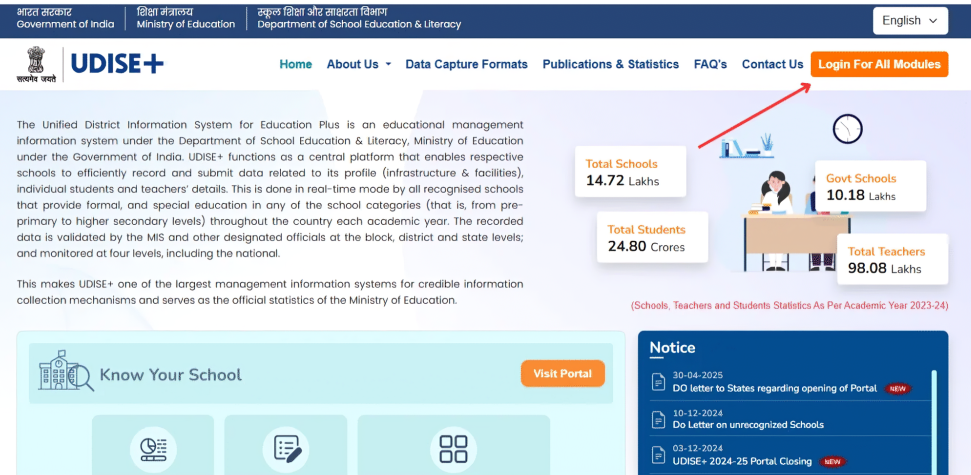
Step by Step: How to Access UDISE+ All Modules

  • Start by visiting the official UDISE+ Portal where all modules are listed.
  • Click on udise Login for All Modules to move forward. 
  • You’ll be asked to select your state — choose it from the dropdown. 
  • Once selected, continue to the login page. 
  • Enter your UDISE+ credentials given by your department. 
  • After login, your dashboard opens with all accessible modules. 
  • Pick the module you want to use, like Student, Teacher, or Reports. 
  • Work on your data based on your role and permissions. 
  • When finished, sign out safely to protect your account.
UDISE+ portal

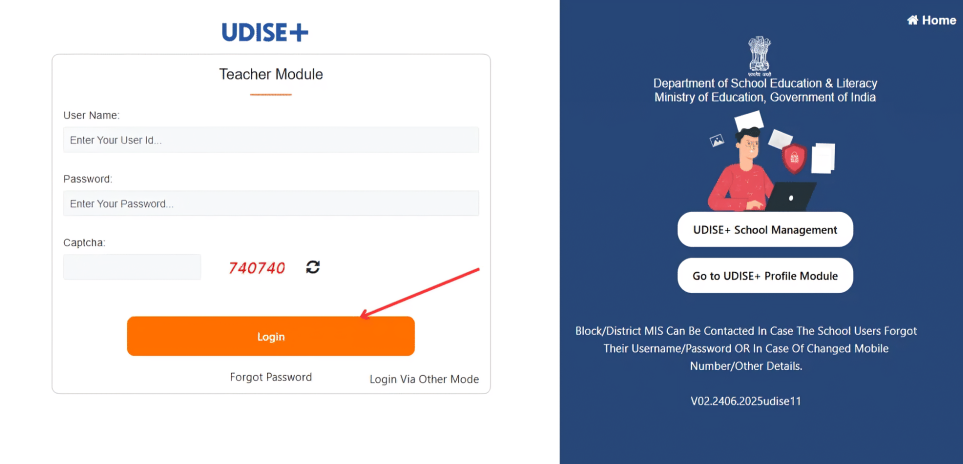
UDISE Plus School Profile Module Login Process

The School Profile Module in UDISE Plus helps you manage your school’s basic details in one place. For UDISE Plus 2025-26, this module is important because it keeps your school information updated and ready for planning and reporting.

Before you move to other modules, this is where you usually start. Once your school profile is correct, everything else on the UDISE Student Module works smoothly.

Step by Step: How to Login to UDISE Plus School Profile Module

  • Go to the official UDISE+ website: https://udiseplus.gov.in/.
  • Look for the option that says Login for All Modules. 
  • From the list, choose your state to continue. 
  • You’ll now reach the UDISE+ login page. 
  • Enter your School UDISE code or username and password. 
  • Complete the captcha and click on Login. 
  • After login, your dashboard will open with multiple options. 
  • Select School Profile Module from the available modules. 
  • Start viewing or updating your school’s basic details. 
  • Save changes carefully before moving to another section.

UDISE Plus Teacher Module Login Process

UDISE Plus teacher module is where you manage and verify teacher-related records in one place. You use this module to keep staff details updated, which plays a big role in planning and reporting at every level. 

If teacher data is correct here, everything else on the portal stays aligned. That’s why this module matters so much for smooth data flow.

Step by Step: How to Login to UDISE Plus Teacher Module

  • Visit the official UDISE Teacher Module: https://udiseplus.gov.in/udiseteacher/
  • Select Login for All Modules from the main screen. 
  • Pick your state to move ahead. 
  • Enter your assigned login credentials. 
  • Verify the captcha shown on the screen. 
  • Sign in to open your UDISE+ dashboard. 
  • Locate and click on the Teacher Module. 
  • Access teacher profiles and service details. 
  • Update or review records as needed. 
  • Save changes before leaving the module.
udise-plus-teacher-module

UDISE Plus Student Module 2025-26

The UDISE Plus Student Module 2025-26 is where you manage complete student data for your school. You use this module to record enrollment, class details, and student status accurately for the current academic year. This module plays a key role because all planning, reports, and policies depend on the student data you enter here.

Step by Step: How to Login to Student Module

  • Visit to the link https://sdms.udiseplus.gov.in/.
  • Click Login for All Modules. 
  • Select your state from the dropdown. 
  • Enter your login credentials provided by the department. 
  • Fill in the captcha shown on the screen. 
  • Sign in to open your UDISE+ dashboard. 
  • Choose the Student Module from the list. 
  • Start adding or updating student records. 
  • Review entries before saving.

Add Class 1 Students in UDISE Plus Student Module 2025‑26

Adding Class 1 students in the UDISE Plus Student Module is one of the first tasks you’ll do at the start of the school year. You use this part of the portal to make sure new kids are recorded correctly right from day one.

This step helps you keep your school’s data clean and up to date, and it makes sure these students start showing up in reports and planning tools on the portal.

Step by Step: How to Add Class 1 Students

  • Go to https://sdms.udiseplus.gov.in to open the Student Module.
  • Pick your state and click Go. 
  • Login using your username and password. 
  • Open the Student Module from your dashboard. 
  • Click Add New Student to start. 
  • Enter student details — name, date of birth, and select Class 1. 
  • Fill in General Profile (GP) info first. 
  • Then complete Enrollment Profile (EP) — admission number, class, and section. 
  • Add Student Facilities (SF) if needed (books, meals, etc.). 
  • Double-check everything and click Submit.

Access The UDISE Plus Report Module

The Report Module in UDISE Portal is the place where you see and download all kinds of school and district reports. This is where you can check student numbers, teacher counts, infrastructure details, and other key data in easy‑to‑read formats. 

With this module, you don’t have to dig through tables or spreadsheets. It brings everything together so you can quickly see how your school or area is performing.

Features Of Report Module

Here are the key things you get inside the Report Module: 

  • Quick view of reports – see data without waiting. 
  • School‑wise summaries – get details for your own school. 
  • Block/District/State reports – compare across areas. 
  • Custom filters – choose what you want to see. 
  • PDF/Excel download – save reports for offline use. 
  • Teacher & student insights – view staff and student data together. 
  • Infrastructure stats – check facilities like classrooms and toilets. 
  • Data submission status – shows what’s done and what’s pending.

How to Access Report Module in UDISE Plus

Here’s how you can get into it, step by step: 

  • Visit to the website link : https://udiseplus.gov.in/udisereport/
  • Find the UDISE Login for All Modules button and click it. 
  • Choose your state to move forward. 
  • Use your UDISE code or assigned username. 
  • Type your password and fill the captcha. 
  • Hit Login to open your dashboard. 
  • Look for the Report Module in the list of options. 
  • Select the type of report you want. 
  • Apply any filters you need (like class, gender, or level). 
  • Click Download if you want PDF or Excel.
udise-plus-report-module

School Directory and User Management Module in UDISE Plus

The School Directory and User Management Module in UDISE Plus helps you keep school lists neat and manage who can use what. This part of UDISE+ stores school identities and lets the right users get access to the right data, so you don’t run into confusion. 

It’s mainly used by officials and coordinators who need to add or update school details and control user accounts. This makes sure the right people can log in and enter data where it matters most.

Key Features of School Directory and User Management Module

Here’s what this module lets you do: 

  • View school directory – see all schools in one place.
  • Add new schools – register new schools when needed. 
  • Edit existing school info – fix addresses, names, or status. 
  • Manage user accounts – create and update logins for people.
  • Assign roles & permissions – choose who gets access to what.
  • Reset passwords – help users get back in if they forget.
  • Update contact details – change phone or email for users. 
  • Control access levels – make sure sensitive data stays safe.

How to Access School Directory and User Management Module

Here’s how you can open it step by step: 

  • Visit the UDISE Plus portal: https://udiseplus.gov.in/
  • Click on Login for All Modules on the homepage. 
  • Choose your state from the list. 
  • Enter your username and password. 
  • Type the captcha code shown on screen. 
  • Hit Login to open your dashboard. 
  • Find the School Directory & User Management option. 
  • Click it to open the module. Start adding or editing school details. 
  • Manage user accounts as per your access.

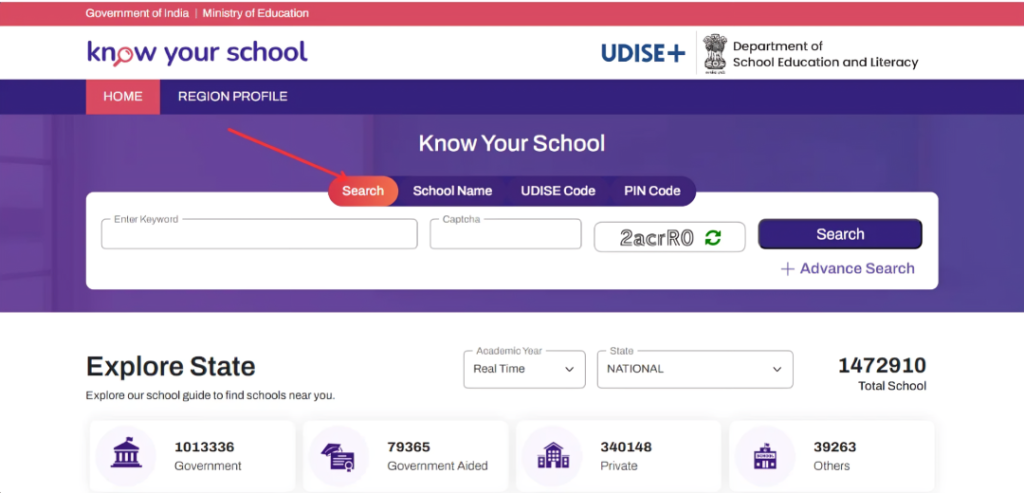
Know Your School On UDISE+

Sometimes, before you update anything or move ahead with student work, you just want to check how your school appears in the system. That’s where Know Your School on UDISE+ comes in. It helps you see your school’s record as it is officially listed under the UDISE Plus school profile. 

Most people use this step quietly in the background. Just to confirm details. Especially when you’re working around admissions or the udise plus student module 2025-26 and want to be sure you’re starting from the right place.

How “Know Your School” Works on UDISE+

You don’t need to prepare anything special for this. It’s more of a quick check. 

  • You start by opening the UDISE Plus website : https://kys.udiseplus.gov.in/.
  • Somewhere on the main page, you’ll see Know Your School.
  • Clicking it opens a simple search screen.
  • From there, you select your state.
  • Then your district, just to narrow things down. 
  • You can type your school name or use the UDISE code if you have it. 
  • Once you search, a list appears. 
  • You pick your school from that list.

FAQs - UDISE Plus

Q: What is the UDISE Plus Student Module?

A: The UDISE Plus Student Module is used by schools to enter and manage student details on the UDISE Portal.

Q: Who uses the UDISE+ Student Module?

A: It’s mainly used by school staff who have official access to UDISE+.

Q: Is the UDISE Plus Student Module active for 2025-26?

A: Yes, the udise plus student module 2025-26 is active for the current academic year.

Q: Where can I open the UDISE Plus Student Module?

A: You can access it through the UDISE Portal at udiseplus.gov.in after logging in.

Q: What kind of details are added in the Student Module?

A: It includes basic student information like name, class, enrollment status, and other required details.

Q: Can student details be edited later?

A: Yes, you can update student information within the allowed time on the UDISE Plus Student Module.

Q: Do I need a login to use the Student Module?

A: Yes, login is required. You can’t access the udise+ student module without valid credentials.

Q: What if I find a mistake in student data?

A: You can review and correct it inside the module or follow guidance from higher authorities.

Q: Is the Student Module connected to other UDISE Plus sections?

A: Yes, student data is linked with reports and other parts of UDISE Plus.

Scroll to Top